Learning Architecture Explained: The Blueprint for Better Training

by Chris Packert | May 15, 2026 | Featured | 14 comments

Emerge ID: Award-winning learning design. AI-powered development. Smarter training at a lower cost.

Dashboards, badges, interactive activities, AI tools. Each one sounds like progress. In Episode 2 of our podcast, L&D Insights at Altitude, our hosts Nora and Ben walk through seven current sources (four peer-reviewed studies, a Gallup study, an OECD report, and a new Colorado tax law) and ask the same thing of each: what changes in how people work? This week's thread is simple. Features are not learning. Each one works only as well as the design around it. Here is what our team took from them.

Watch or listen to Episode 2 on YouTube

Enjoying the show? If you like our podcasts, be sure to like and subscribe to our YouTube channel.

Dashboards: a small average and a wide range

In The Internet and Higher Education, Rivan Gestiardi and Yuniawatika ran a meta-analysis of learning analytics dashboards, displays of learners' own data such as progress or activity. They pooled 21 of 22 controlled studies with more than 33,000 participants, and they left out dashboards bundled with adaptive tutoring or heavy automated feedback, so the result reflects the dashboard itself. For learner-facing dashboards, the average effect was small, about 0.29, and closer to 0.17 after adjusting for possible publication bias. The range across studies was wide enough to include zero. Effects showed up for grades and completion, but not for engagement logs, self-reported self-regulation, or motivation.

The authors' own point is that a given rollout may yield no benefit, so pilot with usage data and evaluate before you scale. The participants were mostly higher education students, not employees, and the authors rate certainty as low to moderate. The screen is not the intervention. What people do with it is.

Badges that backfired

In Behaviour & Information Technology, Sebiha Balci and Bradley Morris randomly assigned 162 online learners to three versions of a course: badges they knew were coming, surprise badges, or no badges. The hypothesis was that surprise badges would work better. It did not hold. Both kinds of badges reduced intrinsic motivation, did not meet learners' need to feel competent, and did not improve performance compared with no badges. It is one short-term study with online students, but it is randomized, and it is a good reason to test badges before you switch them on everywhere.

"Interactive" is a label, not a result

"Interactive beats passive" is a common pitch line. In Learning and Instruction, Christina Wekerle, Michael Sailer, Ingo Kollar, and Tim Fütterer tested the ICAP framework with 249 future teachers. After reading a text, participants reread it, underlined it, answered open questions alone, or answered the same questions in pairs. No condition won on knowledge: the authors found no significant differences in surface or deep knowledge. The pairs did report a stronger sense of belonging. This was one reading task with trainee teachers, and the authors do not say the framework is wrong. They say its evidence base may not be robust yet. Calling something interactive does not make it effective. The task has to make people think and practice.

How good designers work with AI

In the International Journal of Educational Technology in Higher Education, Fang, Feng, Yan, and Zhou watched 67 pre-service teachers build lesson plans with an AI assistant, then rated the plans. The stronger plans came from people who kept cycling between evaluating the AI's draft, revising it, and evaluating again. The weaker plans came from people stuck in loops of unclear back-and-forth. The stronger group also reported lower mental demand and frustration. It is one program of trainee teachers, so treat it as an early signal for workplace designers, and it is correlational: the groups were split by outcome, so it does not prove the habit caused the quality. Still, evaluate, revise, and re-evaluate is a habit you can coach.

Who gets value from AI at work, and who is left out

Gallup's first results from year two of the American Job Quality Study draw on a survey of more than 15,000 U.S. employees. Among employees who use AI, 63 percent say it helps them work faster and 56 percent say it helps them find more creative solutions. Regular use is concentrated, though. College graduates are more than twice as likely to use it daily or weekly (40 percent versus 17 percent), and so are managers compared with individual contributors (37 percent versus 25 percent). In healthcare support, manufacturing production, and retail sales, 70 to more than 80 percent never use AI in their role. Gallup is clear that these are employees' own assessments and that the link to job quality needs more research.

Our reading, not Gallup's claim: if AI training goes mainly to the people already using AI, it can widen the gap.

Most adults are not asking for more training

The OECD's Education at a Glance 2026, released September 29, includes a chapter on adult learning that draws mostly on the 2023 Survey of Adult Skills. Over 75 percent of adults report no interest in more non-formal learning beyond what they have already done. Participation is unequal, too: about 49 percent of employed adults took part in the past year, versus about 34 percent of unemployed adults. The OECD suggests testing interventions that target motivation, not only access. The data are self-reported and cross-country, and the U.S. is one country in the mix. For L&D, the message is plain. Another catalog will not fill seats. Learning has to connect to work people already care about.

Colorado's new software tax and your courses

In June, Governor Jared Polis signed HB26-1223. Starting January 1, 2027, Colorado's state sales and use tax covers computer software however it is delivered, including downloads, software you reach over the internet, and mobile apps. The Colorado Department of Revenue's Computer Software guidance, revised in October 2026, walks through what it means.

The state rate is 2.9 percent. Local taxes are less clear. The legislature's final fiscal note says counties, most cities, and districts like RTD only add this tax if their own voters approve it, and about 70 home-rule cities run their own sales taxes and make their own call. Sellers based in Colorado collect the tax. Out-of-state sellers start collecting once their Colorado sales top $100,000 a year, which was already the rule. If a seller does not collect, the Colorado buyer generally owes use tax instead.

Why does this matter for training? The law keeps two exemptions: software developed for a particular user, and software under an individually negotiated license that both sides sign in writing before or when access begins. Click-through terms and standard form contracts do not count, even if someone signs them. That means a custom course built for one client and a catalog course bought at a website checkout could be treated differently. The law does not mention courses, and the state has not said when an online course counts as software.

Before January, take two questions to your tax advisor. Was this course built for us alone? And is our license individually negotiated and signed by both sides? How you contract and deliver a course may change what you owe.

This episode is general information, not tax, legal, or accounting advice. Emerge ID is not a CPA firm or law firm. Colorado's rules for HB26-1223 are still being written. Consult a qualified tax advisor about your situation.

One contrarian take

The popular story is that better learning tech means better learning: add the dashboard, add the badges, make it interactive, give everyone AI. This week's sources say otherwise. Dashboards helped a little on average and maybe not at all for a given rollout. Badges cost motivation in one randomized test. Interactive activities did not move knowledge in another. Strong AI-assisted work came from judgment, not prompting. And most adults are not asking for more courses.

The feature is the easy part. The design is the hard part: what people need to do differently, why they would care, the practice and support on the job, and how you will measure it. At Emerge ID, Intelligent Design is what the ID in our name stands for. It is what we call our process for combining proven instructional design principles with the speed and production power of artificial intelligence.

Five takeaways

  1. Pilot dashboards and measure before you scale. The average effect was small, and the range included zero.
  2. Test badges before you turn them on. They backfired in one controlled study.
  3. Treat "interactive" as a label. Design the thinking and practice the task requires.
  4. With AI, coach the evaluate and revise loop. Have learners judge an AI draft, revise it, then judge it again.
  5. Aim AI and learning at the people who are not getting them yet. Start with why the learning matters to their work.

The practical challenge

Pick one feature you added to a program this year, such as a dashboard, a badge, or an AI tool, and ask what changed in how people work because of it. If you do not know, that is the place to start.

The ID Angle: what this changes on Monday

Start with the behavior, not the feature. Write down what people should do differently on the job, then pick the tool that supports it. Treat each feature as a test, not a default: pilot a dashboard with a comparison group, and try badges small before you roll them out. Build AI practice around judgment. Open with why the learning matters to people's work. And for Colorado, know how your courses are contracted and delivered, and take the two exemption questions to your tax advisor before January.

Let's design learning that changes what people do

As the episode puts it, "Anyone can add a feature in an afternoon. The hard part is designing learning that changes what people do on the job." That is what Intelligent Design is for: starting with the performance you need, then using proven instructional design principles and the speed of AI to build learning that holds up on the job.

Emerge ID is led by a United States Olympic and Paralympic Committee Coach Educator of the Year with 30+ years of experience in learning and development. If that sounds like your team, there is an easy next step: book a free 20-minute review with Chris Packert. By the next business day, you will get three prioritized next steps. No purchase required.

Planning a new course, onboarding program, or training pathway? Consider Emerge ID for your next project.

Find more episodes of L&D Insights at Altitude every two weeks.

Show notes: Episode 2 chapters

Runtime 13:01. Chapter times match the YouTube video.

  • 00:00 Cold open: do dashboards help people learn?
  • 00:24 Welcome to L&D Insights at Altitude
  • 00:53 This week's thread: features and learning
  • 01:17 Dashboards: a small average and a wide range
  • 02:33 Badges that backfired
  • 03:23 Interactive beats passive? Testing ICAP
  • 04:25 How good designers work with AI
  • 05:28 Who gets value from AI at work? (Gallup)
  • 06:25 Most adults aren't asking for more training (OECD)
  • 07:18 Colorado's new software tax and your courses
  • 09:31 One contrarian take
  • 10:25 Recap
  • 10:51 This week's challenge
  • 11:05 The ID Angle
  • 12:15 Next steps

Hosted by AI voices. Research by the Emerge ID team.

Gallup's American Job Quality Study is conducted with Jobs for the Future and The Families & Workers Fund.

Sources cited in Episode 2

Colorado HB26-1223 sources:

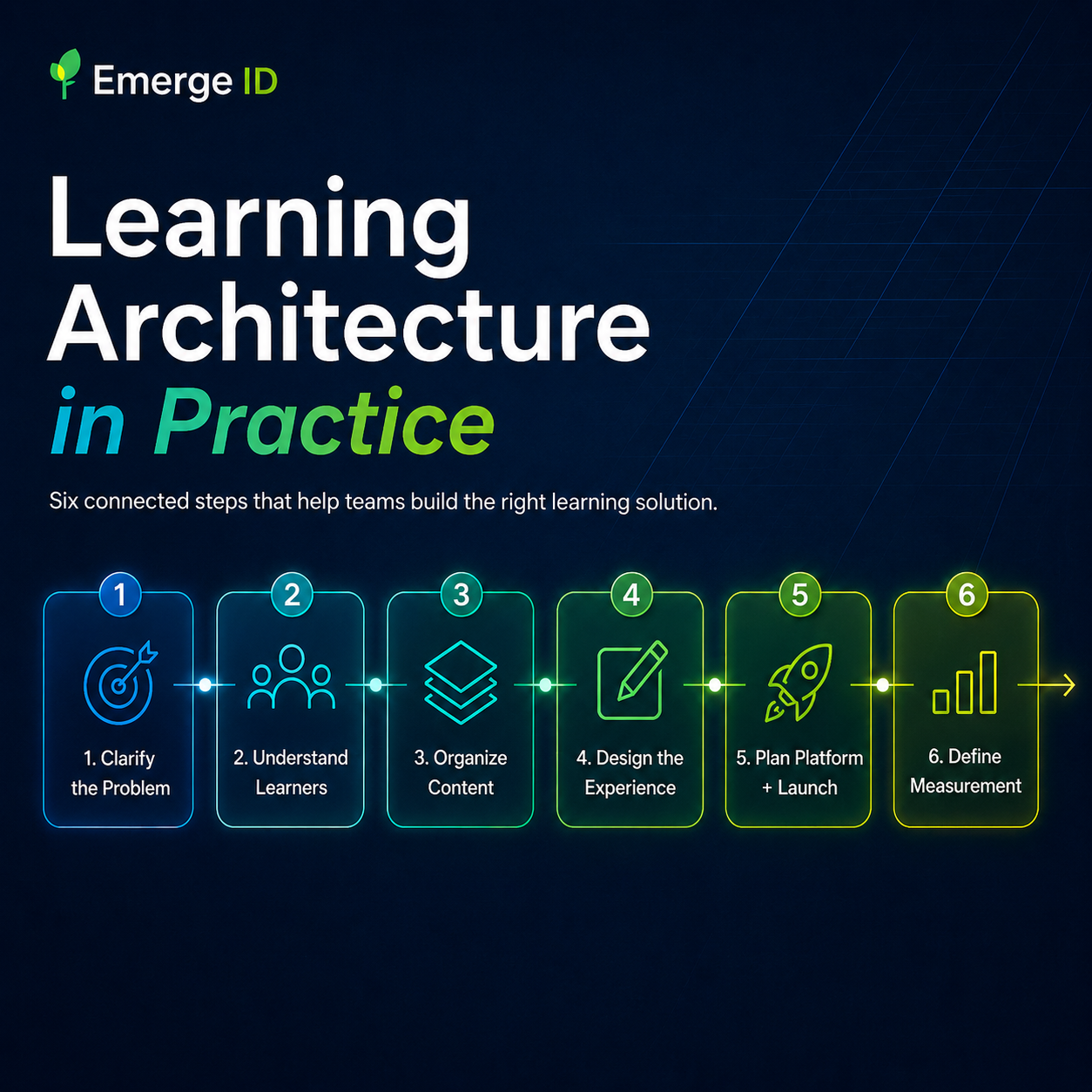
Emerge ID branded hero graphic titled “Learning Architecture in Practice” on a dark blue background, showing six connected steps in a learning process flow: 1) Clarify the Problem, 2) Understand Learners, 3) Organize Content, 4) Design the Experience, 5) Plan Platform + Launch, and 6) Define Measurement. Each step appears in a glowing card with a matching icon and brief description, connected left to right by a neon line. Supporting interface-style panels in the background show a learning strategy blueprint, learner journey, and impact dashboard with charts and metrics. Additional callouts at the bottom highlight aligned teams, focused solutions, seamless implementation, and measurable impact, reinforcing the message that Learning Architecture creates clarity before build so learning creates impact after launch.
Emerge ID podcast companion banner with the Emerge ID favicon, bold “Podcast Companion Available” text, a microphone icon, audio waveform graphics, and a callout inviting readers to listen to the episode connected to the blog post.

Before you build another course, pause here.

Most learning projects begin with a familiar request:

“We need training.”

Sometimes that request is exactly right. But often, it is only the first clue that something else is happening underneath the surface.

A team may be struggling with inconsistent onboarding. A process may be unclear. Managers may be repeating the same explanations again and again. Learners may be completing courses but still not applying the information correctly. Stakeholders may be asking for a new module, a refreshed course, or an LMS update without first confirming the real performance need.

That is where Learning Architecture matters.

Learning Architecture helps organizations step back before building and ask the questions that determine whether the final learning experience will actually work.

What problem are we trying to solve?
Who needs to change what they know, do, or decide?
What does success look like after launch?
What content is essential, and what is simply noise?
Where will the learning live?
How will learners practice?
How will we know whether the experience made a difference?

When those questions are skipped, training can still get built. But it is much more likely to create rework, confusion, low adoption, poor measurement, and stakeholder frustration.

Learning Architecture is the work that helps teams build the right thing before they spend time, budget, and energy building the thing right.


What is Learning Architecture?

Learning Architecture is the strategic structure behind an effective learning experience.

It connects the learning need, audience, content, design approach, technology, implementation plan, and measurement strategy into one coherent system. Instead of treating training as a single course or one-time deliverable, Learning Architecture views learning as an experience that must be planned, designed, built, launched, supported, and improved over time.

At Emerge ID, we think of Learning Architecture as the bridge between a business or organizational need and a learning experience people can actually use.

That means it includes more than instructional design alone. It may involve:

  • Clarifying the problem before recommending a solution
  • Aligning stakeholders around goals and expectations
  • Organizing content into a learner-friendly structure
  • Designing practice and application, not just information delivery
  • Choosing the right LMS or learning platform approach
  • Planning implementation so learners know what to do next
  • Defining meaningful metrics before launch
  • Creating a sustainment plan so learning improves over time

In plain language, Learning Architecture keeps learning projects from becoming a pile of disconnected pieces.

It creates the blueprint.


Why training requests are not always training problems

One of the most expensive mistakes organizations make is assuming that every performance issue requires a course.

A training request might sound like this:

“Our employees are not following the process. We need a refresher course.”

But after a closer look, the real issue might be that the process is unclear, the job aid is outdated, managers explain the process differently, the LMS is hard to navigate, or employees do not have enough practice making decisions in realistic situations.

In that case, building a course without clarifying the real need may only add another layer of frustration.

This does not mean training is unnecessary. It means training should be designed around the right problem.

Learning Architecture helps teams separate symptoms from causes. It gives stakeholders a clear way to evaluate what learners need, what the organization expects, and what type of solution will create the most useful result.

Sometimes the answer is a full course.
Sometimes it is a short pilot module.
Sometimes it is a redesigned onboarding path.
Sometimes it is an LMS cleanup.
Sometimes it is a better measurement strategy.
Sometimes it is a combination of several targeted building blocks.

The value is not in building more learning. The value is in building learning that solves the right problem.


The cost of skipping Learning Architecture

When organizations move straight from “we need training” to “let’s build a course,” the hidden costs usually appear later.

Stakeholders disagree after development has already started. Subject matter experts add more and more content because the scope was never clearly defined. Learners complete the course but still do not feel confident. Leaders ask whether the training worked, but the only available metric is completion. The LMS technically hosts the course, but learners struggle to find it, access it, or understand what they are supposed to do next.

None of these problems happen because people do not care.

They happen because the project moved into production before the learning architecture was clear.

Skipping this step often leads to:

  • Rework and revision loops
  • Bloated content
  • Confusing learner experiences
  • Weak adoption
  • Poor transfer to real work
  • Frustrated SMEs
  • Unclear reporting
  • Training that launches but does not change behavior

Learning Architecture reduces those problems by creating alignment before development begins.

It helps teams make better decisions earlier, when those decisions are still easier and less expensive to change.


What Learning Architecture looks like in practice

A strong Learning Architecture process does not need to be overwhelming. The goal is not to slow the project down. The goal is to prevent the project from speeding in the wrong direction.

A practical Learning Architecture process usually includes six connected steps.

1. Clarify the learning problem

Before designing anything, define the problem clearly.

What is happening now?
What should be happening instead?
Who is affected?
What is the cost of leaving the issue unresolved?
What does the organization need learners to know, do, decide, or improve?

This step creates focus. It also helps prevent the common pattern of building training around vague goals like “increase awareness” or “improve understanding” without defining what successful performance looks like.

2. Understand the learners and context

Learning does not happen in a vacuum.

A strong design considers who the learners are, what they already know, what barriers they face, what motivates them, what tools they use, and how the learning fits into their real work.

This is where accessibility, cognitive load, time constraints, role expectations, and learner confidence matter. If the experience feels too confusing, too long, too generic, or too disconnected from the learner’s reality, adoption will suffer.

Learning Architecture helps design for the actual learner, not the idealized learner.

3. Organize the content

Many training projects begin with too much content.

Learning Architecture helps identify what is essential, what is supporting information, what belongs in the course, and what may be better suited as a job aid, manager guide, checklist, resource library, or follow-up communication.

This is one of the most important steps for reducing cognitive load.

Learners do not need everything a subject matter expert knows. They need the right information, at the right time, organized in a way that helps them act.

4. Design the learning experience

Once the problem, audience, and content are clear, the learning experience can be designed intentionally.

This includes the course structure, interaction strategy, practice opportunities, feedback loops, assessment approach, multimedia plan, and learner journey.

For simple awareness or onboarding, the design may focus on clarity, confidence, and recall. For roles that require judgment, the experience may need scenarios and decision-making practice. For high-stakes work, learners may need deeper practice, performance criteria, and validation before the solution scales.

This is where Learning Architecture protects the project from becoming “content on slides.”

5. Plan the platform and implementation

Even a well-designed course can fail if the launch experience is confusing.

Learning Architecture considers where the learning will live, how learners will access it, what the LMS needs to track, how managers or facilitators will support it, and what communication is needed before and after launch.

This matters because learner adoption is shaped by friction.

If people cannot find the course, do not understand why it matters, or do not know what to do after completion, the learning experience loses momentum.

6. Define measurement before launch

Completion is not the same as effectiveness.

A strong Learning Architecture process defines what should be measured before the course launches. That may include participation, completion, assessment performance, learner confidence, manager feedback, behavior change, operational indicators, or other meaningful signals.

The key is to decide what evidence will help the organization answer better questions:

Did learners understand the content?
Can they apply it?
Are they more confident?
Are managers seeing improvement?
Where are learners struggling?
What should we improve next?

Measurement should not be an afterthought. It should be built into the architecture from the beginning.


When should an organization use Learning Architecture?

Learning Architecture is especially useful when a project has real stakes, multiple stakeholders, unclear scope, or a history of rework.

It is a smart starting point when:

  • A team keeps asking for training but the root problem is unclear
  • Onboarding is inconsistent across locations, departments, or managers
  • Existing courses are outdated, too long, or underused
  • An LMS has become difficult to manage or navigate
  • Leaders want better reporting than completion data
  • A learning project has stalled because stakeholders are not aligned
  • SMEs have valuable knowledge, but it is scattered or trapped in people’s heads
  • The organization needs a pilot before investing in a larger build
  • Learners need practice, not just information

In these situations, Learning Architecture gives the team a clearer path forward.

It turns uncertainty into a plan.


A better way to begin: start with clarity

The best learning projects do not begin with development.

They begin with clarity.

That clarity does not have to take months. It can start with a focused needs analysis, a Learning Architecture Starter Kit, a pilot module, or a targeted strategy conversation.

The important thing is to pause long enough to make sure the solution matches the actual need.

At Emerge ID, our Learning Architecture approach helps organizations move from scattered requests to structured solutions. We help teams clarify the problem, design useful learning experiences, choose the right technology path, build with accessibility and measurement in mind, and improve the experience after launch.

Because the goal is not just to launch training.

The goal is to create learning that people understand, use, and trust.


Ready to build the right thing before you build the course?

Before you invest in another course, module, or LMS update, take time to clarify the learning problem first.

This image shows the author of the blog posts.

Written by Chris Packert

Chris Packert is the founder and CEO of Emerge ID, a learning architecture and instructional design company that helps organizations design, build, launch, and improve meaningful learning experiences. With more than 30 years of experience across K–12 education, higher education, workforce development, military distance education, and sport education, Chris brings a practical, systems-based approach to learning strategy. His work focuses on helping teams clarify performance needs, create accessible and engaging learning solutions, implement effective learning technology, and measure impact beyond completion data. Through Emerge ID, Chris partners with organizations to turn complex learning challenges into clear, usable, and measurable learning experiences.

Related Posts

14 Comments

Submit a Comment

Your email address will not be published. Required fields are marked *